VCM2 2 in 1 for Ford and for Mazda IDS V121 Diagnostic Tool VCM 2
VCM 2 Scan tool can do diagnose, scan, airbag, key programming, ecu programming, PCM programming via OBD2 port.
Ford VCM2 Highlights:
1. Softwares for Ford and for Mazda can't work in one computer.
2. Please install the VMware software firstly, and then install the software for Ford in the VMware station.
3. Please change the computer time zone to China time zone
4. Computer configuration: WINDOWS Win7 32bit system, and at least 4GB Memory and Dual Core. It can't run in win 8 or win 10.
5. This VCM2 doesn't support for Ford trucks or diesels at all (including the F150/Explorer/etc.) pls take notice. thank you! if you want to work with Ford F150 serial cars, we suggestion you to choice Best quality FORD VCM 2 .
6. Support VMM and CFR , do not support F250
7. Provides full dealer diagnostic capabilities to Most 16pin cars 1996-2016 for Ford (can't do 24v vehicle.) including for some new 2016 vehicles. Supports the car after 1996 for Mazda.
pdate via link ( we will send the link to you to download the newer software )
FORD VCM2 V121 Software Free Download:
https://mega.nz/folder/VU0gzQYD#oql4yoWa3_rmj-u3MzAwJA
VCM 2 Features:
1. The VCM 2 is the new OEM diagnostic tool. It provides dealer-level diagnostics using the IDS software.
2. The VCM 2 is the brand new diagnostics interface from for use with the Integrated Diagnostics Software (IDS).
3. The VCM 2 and IDS provides full dealer diagnostic capabilities for most 16 pin .
4. The VCM 2 will be required for all new 2013 vehicles and is backwards compatible with most 16 pin Fds.
It supports the Vehicle Measurement Module (VMM) and new Customer Flight Recorder (CFR).
5. The VCM 2 has shock resistant rubber ends, making it suitable for garage and workshop environments.
6. The CFR replaces the Vehicle Data Recorder (VDR).
7. The CFR is an optional cable that allows the VCM 2 to monitor and record live data streams. This provides an advantage for technicians when diagnosing
VCM 2 Function:
-Automatic vehicle recognition
-Read & Clear Diagnostic Trouble Codes (DTCs)
-Live Data-stream with Recording & Playback Functions for Main ECUs
-Guided Fault Finding
-New Software Re-flash for Existing ECUs
-Programming & Installation of new ECUs (PCM, ABS, Instrument Cluster, Air Bag, Fuel Pumps, etc.)
-Program New Keys
-Injector Coding
-Set, Adjust or Remove Speed Governors
-DPF Regeneration
-Brake Bleeding
-Steering Angle Resets
-All Other Dealer Functions
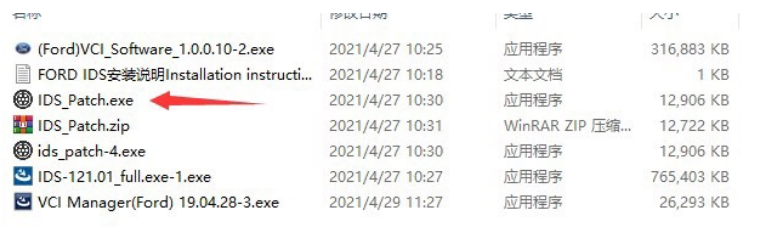
FORD VCM2 VCI Software Installation Instruction:
1. Install Ford IDS-***
2. Wait for the installation of Ford IDS - * * *, and restart the computer
3. Install the Ford original VCI software_ 1.0.0.10.exe
4. Install VX manager and Ford IDS driver
5. Wait for VX manager and Ford IDS driver installation to complete
6. Connect VCX device and install idspatch
7. Use idspatch to open IDs and start diagnosis.
VCM 2 Package List:
1pc x VCM2 interface
1pc x OBD2 cable
1pc x USB cable
1pc x CD-DVD



